Home About Meet Contact
Showing posts with label heidi. Show all posts

Thursday, March 7, 2013

Blog Tips: Promoting Your Blog by Joining Blog Hops


  Promoting your blog is one of the best things you can do to attract followers. There are so many ways to do so, a lot of which we have already covered. One in particular is joining Blog Hops. Blog Hops (or Link Ups) are a blog link up hosted by one or many bloggers and is usually set on a certain day of each week, where other bloggers can come link up their blog with the chance of other bloggers hopping back to their site. A pretty simple concept to get your blog noticed by others, and it's basically like free advertising every week.

Rules
 Each Hop host might have a certain set of guidelines that need to be followed, which are pretty easy to follow through with. Most will have you Tweet out about the hop, away to attract other bloggers to come join in. They will also ask you to make sure you follow all the Hosts and/or Co-Hosts involved with that particular link, kind of like a "thank you" for hosting. And of course, what is a hop with out going to check out the others who have linked up. Some of these hops can attract HUNDREDS lovely bloggers to link up, some of which my stop by blog as well. So be sure to check out others, even leave a friendly comment letting them know you found them through "such and such blog hop" and you are stopping by to say hello. (Please don't ask for a return follow; I think we have covered that one already). Pretty simple rules. Some might ask for more or less, each hop is different and unique in itself.

Types of Hops
 If you have never joined a hop before, you might be asking yourself "Is a blog hop right for my blog??" The answer is yes! There are different types of hops out there, all pertaining to different aspects of blogging! So might be for your blog while others not. The best part is, there are so many to choose from.

GFC Hops: These hops are geared towards Blogger blogs that have GFC followers (Google Friend Connect). They are open to all blogs that use GFC (mainly those through Blogger). Here are a couple examples to check out:

DIY/Creative/Craft &/or Food Hops: If you do a lot of DIY/Crafts or share recipes, then these hops are for you. Not only is it a great way to promote your blog, but also a great way to feature your latest project on your blog. These hops with ask you to link up a specific post from your blog, not a direct link to your blog. Here are some examples:

Fashion/Style Hops: If you share those "What I Wore" outfit posts, then these hops are right up your alley. The blogs that host these hops with host them once a week. They will show you their outfit(s) for the week and then will invite you to link up you outfit post as well. Here are some:

Social Media Blog Hops: These hops are not only for your blog, but for social media too. They will have you not only hop to the linked up bloggers blog, but also whatever social outlet they have linked up as well. Examples:

Misc. Hops/Link Ups: These hops fall under various categories. They will have you link up a heart-felt post, things that are on your mind, VLOGS, etc.
Examples:


That's just a short list of the different types of hops or link ups out there. There are hundreds that go on through out the week.

 The hosts of these hops and link up also like a little recognition on your blog as well. Whether it be linking back to their blog in your particular post, putting up a their button up some where on your side bar, or you can create a separate page (so your side bar doesn't get cluttered) and put all the Hops and Link Ups you join on that special page and label in "Linky Party" "Link Ups" or "Blog Hops" just so those that want to see what link ups you join every week can see the list of them.

 Now that you are hopping, you might even have the urge to start your own Blog Hop. GO YOU!! It's a great way to meet new bloggers and for long lasting blog friendships!!

 Do you have a Blog Hop or Link Up that you either Host or Join that wasn't mentioned?? Leave us the name and link of it in the comments below.


Pin It

Thursday, February 28, 2013

Blog Tips: Social Media

 So you have your blog up and running. Your followers are slowly trickling in, slower than you might like but they are there. I am sure you are wondering, "How do I get my blog out for all to see??!" Well this is where Social Media comes in. Don't be scared, social media will be come your partner in crime in this blogging world! It's time to embrace it and use it to your advantage. I like to think of social media as free advertisement in away, you just have to know how to use it to receive it's full benefits.

 I will share some tips and tricks for a few of the major social media outlets that are out there and how you can use them to gain more traffic to your lovely blog.

Facebook
 We all know about Facebook, unless you live under a rock of course. If you haven't already, you should get yourself a Facebook Fan Page. Yes, you now have FANS! Creating a page for your blog is a great way to help share with others your posts and direct traffic back to your blog. But it is also a way for you to stay connected with your readers, where you can ask questions, share fun things/ideas and such.
When you get to this create a page section, you want to use the Brand or Product section. You will then select Website in the drop down window and then type in your blog name in the allowed area, agree with the Facebook terms and TADA! You have a fan page. From there Facebook guides you through how to get it all set up: how to post, invite friends to be fans, update information, add a picture and cover photo, etc.

 I suggest that you keep the same design scheme you have on your blog over on you Facebook page.  If your blog and Facebook page look completely different, it might be confusing and your readers might not think they even go together, which might mean less followers. Use the same photo you have on your blog as your profile picture, if they see your photo they will automatically connect the 2. Also, try and have your blog header as your cover photo. You can easily do this through PicMonkey:
 You can arrange the photos to your liking, until you think it reflects the look on your blog. Then plug it in on your fan page. PicMonkey's FB Cover is perfect, because the size is perfect so your image wont look wonky or distorted once you have uploaded it.
 Now you can start sharing your page to share all your posts. Just copy and past the post's URL link into your status area. I like to give my new posts a brief description with something to draw the reader in to want to read more, but don't give to much away, that's what the entire blog post is for. Once you start gaining more fans, you can start interacting with them more. Stuck on what to write for a new blog post, ask them a question and get feedback, this is a great way to get your brain going.
 When you are logged into you fan page account (not your personal) go and like other blog's fan pages, and comment on their pages with your blog account. It's a great way for not only the other bloggers to see you have a page, but also for those bloggers fans to see it too. Which then will direct traffic to your Facebook page, which will eventually mean back to your blog. Win/Win situation!

Twitter
 Twitter is probably one of the best known social media tools used by bloggers. It's another great way to stay connected and follow all your favorite blogs. When starting up a Twitter account or if you already have one, you want your Twitter handle to go with your blog (just like your Facebook page). The nice thing about if you already have an account, you can easily change it to match your blogs name. If they already know your blog name, when they go to interact with you via Twitter they will automatically think to type in your blog name. So if it's different, they may have a hard time finding you or even just remembering what it is. For example: My blog name is Antlers & Roses so my Twitter handle is @antlersandroses.
 Like I mentioned above with keeping the same design going on your Facebook page, you're going to want to do the same on Twitter too. Since starting my Twitter account a few years back, they have made some great changes which allows you to design your profile page.
 I used my header as my background and the same photo that I have on my blog. You can then plug in your blog address to link it all back to your blog, home base!
 Now when sharing your posts, I have found that using Bitly to shorten my URL posts is the best method. Not only does it shorten your link and help you track clicks, but it leaves you more room to add more info with in that 140 character window. If you don't use Bitly, definitely check it out.
 Of course interaction with others on Twitter is always a must. I pop on through out the day to see what's new and reply back to those who have caught my attention. I have made new "friends" on Twitter by just browsing and checking out what's "happening" in the world of Twitter, which then led me to find their blogs and in turn them following mine.
 Another great thing on Twitter is you can do fun shout outs to either your followers or to those who have ad spaces on your blog (if you are doing them). Most of them that I have noticed tend to fall on a Friday, Follow Friday. Use the hash tag #FF and tag all of those wonderful blogs who you want to show some love too! Now of course you can do this any day of the week, not just Friday. We all love getting special shout outs when it's unexpected too.

Pinterest
 Pinterest, the best thing since sliced bread! Or as my Husband likes to call it, a ridiculous waste of time (he's obviously never used it before!) Pinterest is the best way to keep all those projects that are floating around the web organized and in one easy accessible spot. I am sure you have tons of boards for various things; DIY, Food, Fashion, Hair & Make Up, Organizing... The list can go on and on really. Now it's time to use Pinterest to your advantage!
 If you don't already have a special board for you blog alone, then you need to! I have mine named after my blog itself which keeps it pretty easy to find when pinning and those that are following that board know that that board contains posts directly from my blog. When ever you have a new post that you feel is "Pin Worthy" go ahead and pin it to your blog board! I usually title with with "New Post" and a brief description for it too. Now what I also do, that I have seen that some others don't agree with, is I post it to other boards it applies to. Say it's a DIY post then I will also pin it to my DIY board. If it contains some good information as well, I will also pin it to my Good To Know board as well. Some say that this is Pinterest spam, and that no one wants to see the same pin pinned 5 different times. But most of the time those that are following you, aren't following all your boards. Say you only pin that DIY project only onto your Blog board and there are say 20 people who only follow your DIY board and don't follow your Blog board, then you are missing out sharing this post with those 20 people. It's all a matter of opinion on how much to pin or not. Use your own judgement.

Instagram
 Instagram is probably one of my MOST favorite of all Social Media! I am constantly on there posting pictures of the kids, what's new, the typical outfit post, and of course information on new blog posts! Yes, use Instagram to share your blog posts! Now of course you're going to want to get your Instagram account to mesh with all of your other media outlets. Same picture, add your blog URL, you know the drill. I find it's best to post what best reflects your blog. So I blog about family, creative projects, fashion outfits, home life. So I try make sure my photos reflect that.
 Now like I mentioned, you can also share your blog post through your Intsagram photos. Most of the posts I share from my blog have pictures in them. So I get on my blog through Safari and save the picture I want to share. Then load it on to Instagram with a brief description and then let those know who are viewing the picture that I have a link to my blog in my profile.
Example:
Also, if you haven't started using Hash Tags yet, you need to start. Hash tags are key words used for searching specific things. As you can see I used the hash tags #blog #blogger #blogpost #blogging #antlersandroses When some one is searching these hash tags on Instagram (and/or Twitter) this photo will be in the list of results. Which then leads them to see that I have a link for them to check out (my blog). If your profile is private however, hash tags will not benefit you because your account is private and photos cannot be viewed by those who are searching.
 Sometimes you might write up a post that doesn't contain a photo. So how do you share that you have a new blog post?? Take a photo that you feel reflects that post. You can get really creative with it too, something that is eye catching always draws in those who want to find out more about the photo.

 I think I covered the basics to getting started with Social Media. There really is no right or wrong way to go about it. It's really about what works for you. Don't be scared to follow others and interact by commenting or "liking". It's all about getting your foot in the door to get you and your blog out there and noticed! And now that you have all your media accounts set up, you can create Media buttons for your blog that will direct  followers to which ever social media you are using. We can share all that in a different post!

If there was a topic that pertains to Social Media that wasn't talked about but you would like to know more or you just have questions you would like answered, feel free to leave a comment below!


Pin It

Tuesday, February 19, 2013

Blog Tip: Basic Photo Tips for Bloggers

At some point in you blogging career, you will do some sort of post that will need photos taken by you. Whether it's to show off that yummy dish from the recipe you plan on sharing, product shot of some new items for your shop, to show off your amazing craft skills with you step by step tutorial, etc. What ever it may be, at some point you should plan on taking pictures. Bet you didn't think you would add photographer to your skill set when starting a blog.
Now I wont get super technical here, just give you some basic tips to help get you started with simple shots you might need to get you by. I am going to show you how I take a good majority of my blog photos and what steps I use to achieve a simple yet great looking photo. For about 90% of my photos, I use my DSLR camera and then edit in my photo editing program (Lightroom) on my computer, the other 10% are taken with my iPhone and edited with a photo app. So I thought I would share just a few tips using both.

Basic Photo Blog Props
 To keep this very basic there are really only 2 things you need other than the item being photographed.
  1. LOTS of BRIGHT NATURAL LIGHT! The perfect set up is next to some bright windows or sliding glass doors. This helps give your photo nice light with out harsh shadows and wonky lighting.
  2. You can either get a tri-fold white foam board or a plain white poster board. This will be your background/backdrop for your photos. I like the tri-fold because it has a large open space for multiple items and you can set it up several was depending on how you are shooting. The white helps bounce the light around the image and I just like the crisp, clean look it gives to the photos. Looks less busy when I have it all posted on the blog.
  • This isn't necessary, but I would suggest investing in a tripod as well. You can get really inexpensive one if you shop around. It will help to keep your shot still and less blurry.
 And that's it for materials needed when taking your photos. Pretty basic and wont break your wallet. As you get more comfortable with the picture taking aspect of blogging you can branch out and experiment with different backdrops. I have plans to make some using reclaimed wood - the possibilities are endless really.

Camera Adjustments
 If you know your way around your camera, then this next step is again pretty basic. If you have a nice DSLR camera and haven't got a clue how to use it... I suggest getting to know your camera a little bit better - pull out the manual, watch YouTube videos, take classes, or just use your camera and mess around with it to get a feel for how it can work in different settings. Like I said, these are just basic steps, nothing too technical. Now when shooting I always check how my camera is shooting in the area it's in and just do a quick shot to see how the lighting is. Most of the time to achieve the look I want with out getting too technical, all I do is adjust the shutter speed. This is basically adjusting how much light you are capturing in your photo. 

 The setting wont be perfect for every shoot you do, so always make sure you do some test shots before you get to far in. This is just an example of too dark or too bright. The bigger the bottom number (800) the darker the photo will be, the smaller the bottom number (2) the brighter the photo will be.  And every camera is different, so do be scared to refer back to your manual or look it up. Once you get it down, it will become one of those automatic steps you just do.

Now you're ready to shoot! Take lot of photos, use different angles, get close-ups, take some wide shots, play around with the set up you have. It's better to take more photos while you are there in the moment then wishing you did after you have packed everything and you're sitting there ready to write up your post.

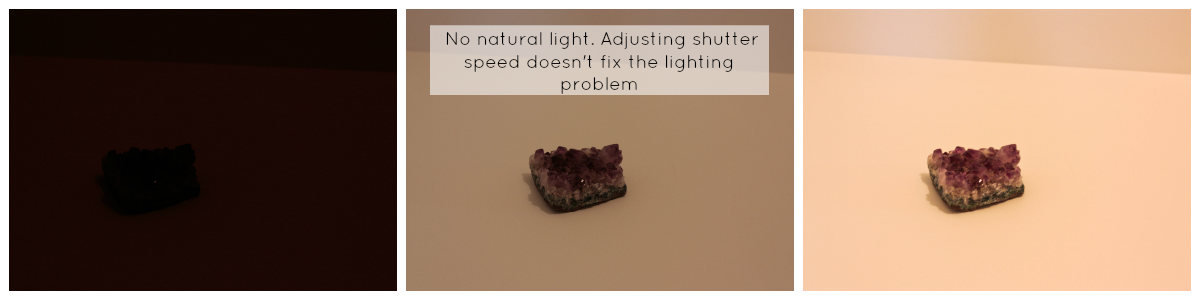
No Natural Light...

This is an example of how not to take your photos. In a dark hallway, with no natural light. While there is light coming from the lights, they don't photograph well.


These 3 photos I showed how I tried to adjust the shutter speed to capture more light. While it did get better lighting as I adjusted, you can still see the lighting is a little wonky. You can try and fix it out of camera in an editing program, but there's no guarantee that it will be a nice crisp photo.

So here are the results from my basic shoot. One is straight out of the camera with no editing and the other has slight editing is a photo program. NOTE: If you don't have a photo program on your computer, there are tons of online editing tools that can give you the same effect of editing: PicMonkey  and Pixlr are 2 that I use often.
This is straight out of the camera. No editing what so ever. You can see by making those simple camera adjustments, I can basically get away with out editing if I wanted too.
This is the edited version. Not much difference really. I usually sharpen the image just a tad and it's usually good to go.
Using iPhone
So here are some simple tips to use when shooting with just your iPhone. Still set everything up like I mentioned in the beginning of this post with your photo props and backdrops, that will stay the same. Now grab your phone and get ready to shoot.
When shooting with your iPhone, there are 2 basic tips to know: How to lighten and darken your image.
  1. When ever your image looks like it is going to be too bright, touch the lightest area on your screen and  it will adjust the lighting so it is a bit darker. Some times if it's too bright you can't see any of the details you are wanting to shoot, so darkening the image will help focus in on those darker details.
  2. If when you are shooting and the image is far too dark for your liking, touch the darkest area on the screen and the image will readjust so the image is brighter. This is usually how I like to shoot my images if I am using my iPhone. It looks brighter and cleaner.
Here are the results I got when using my iPhone to shoot.
This is the image with out a touch of extra editing. While it looks okay, it's a tad dark for my liking.
Here is a look at the same photo that is edited. I use the VSCO app for majority of my editing. I adjust the highlights, shadows, and sharpen it up a bit.
There you have it. So simple and basic tips to take with you when you go to shoot for your next blog post. I hope that wasn't too confusing. If you have any questions about anything, feel free to leave a comment below.


Pin It

Thursday, February 14, 2013

Blog Tip: Blog Commenting - Do's & Dont's


  Blog commenting is a crucial part of the blogging world. Not only is it a way for the reader to feel connected to the blog/blogger that they are following, it's also another way for us Bloggers to connect with other Bloggers. While there are other means of contacting or corresponding, such as Social Media or Email, blog commenting is another way to stay connected. I have read many blogs and/or books that say commenting can be your key to gaining more readers/followers from other blogs, and I have to say that I completely agree with this. Commenting on other blogs shows your presence in this LARGE blogging world and helps create new relationships, which in turn can create life long friendships. I know that sounds silly, becoming "friends" with someone you have never met, but I have "met" many bloggers and built awesome blogging relationships just through commenting alone.
  Now with all that said, commenting can also turn off other bloggers from wanting to follow you by just your comment content. Just because that book/blog said "You need to comment to gain a following" doesn't mean you go and blow up another bloggers comment box just because. I want to share a few tips on what I feel are some basic Do's and Don'ts on blog commenting. {These are just my opinion, and from my observation as a blogger}

Do's

  • Make your comments relevant to the blog post you are commenting on; compliment on what you just read and how it made you feel.
  • Share a brief incident that you feel was similar to the post you read. Bloggers love to see that their readers have things in common with them. {If you feel that you have more to share with them, I would email them instead of writing a whole book in the comment feed}
  • Let them know you are a new follower to their blog and/or how you found them. 
  • Always make your comments feel warm and up lifting; We all want our blogging community to be a tight, supportive group.
  • Be a great replier; If possible try and respond back to the comments that are left for you on your blog. Sometimes it seems like a long tedious job, but remember that these followers are commenting because they love what they just read and are showing their appreciation for your post. So even just a simple "Thank You" shows that you appreciate them.
  • Comment on a regular basis; You can't expect one comment to do magic, it might feel like a daunting task but it's worth it in the long run. You can even set a day in the week where you go through your favorite blogs to catch up on the latest post and leave comments. You don't want to get burnt out on commenting either, so setting time aside for this will feel less overwhelming. 
Now of course there are some don't...

Don'ts

  • Like I mentioned in the Do's about being brief in you comments (like maybe 1 maybe 2 paragraphs is good) try not to dump 5 paragraphs in a comment box. Send it in an email. Or if your comment is going to be pretty compelling, you might consider using it for a post on your own blog. Sometimes our ideas/posts are inspired by what we read on others blogs; be sure to leave a little love and link back to that source you were inspired by (and even send them the link).
  • Don't gossip or air your dirty laundry on someone's comment feed; No one wants to read any negative comments about others, especially when they are not nice ones.
  • Above I mentioned about stating you were a new follower; Stating you are a new follower is fine and dandy - we all love knowing we have new followers, but I personally think it should be left at that. Leaving a comment on why the blogger needs to be following your blog, for me is more of a reason why I probably wont follow back. Leave your comment that is relevant to the post, state you are a new follower (Mention where you found their blog; ie. Blog hop or Link Up), and then instead of telling them to "follow you back" or "go check out my blog now, cause I am following you", you can leave the link to your blog. A link is a nice way to still show that you have a blog that you would like them to check out without throwing it in there face and your comment sounds more genuine with out the plead for a follow back. I personally will be more inclined to check out their blog when they have left just their link and not telling me that I need to do. {Hope that doesn't come off harsh}
  • Don't be a Debby Downer; That explains it self.
  • If you don't have anything nice to say, well then don't comment! While there may be posts you come across that you don't entirely agree with, think before you comment. You can state your opposing opinion with out sounding offensive, but if you feel you can't contain your emotions then you probably shouldn't leave a comment or you again can write an email. No blogger really wants to receive an email that is an angry rant from a reader, but if you feel like there is something you need to say an email is better than a comment.
 There are probably a ton more Do's and Don'ts, these are just a few. I myself have been guilty of  some (not all) early on in starting my blog. I am not saying that these are the EXACT way you have to comment, these are just some tips to help you along in your blogging career. 

Xo,
Heidi
Pin It